

Read the New York Times online through our website using 72-hour code activations.
Getting Started
- Click on this code redemption link to take you to a screen that looks something like this:
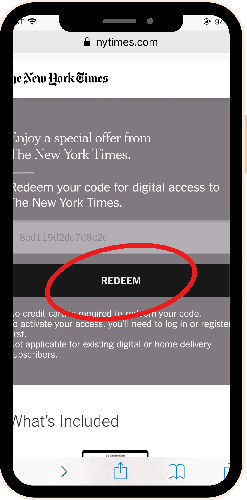
Click “Redeem” to get 72 hours of continuous access.
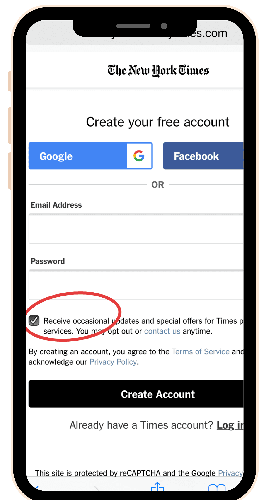
Register with your personal email address, or click on “log in here” if you have already created an account. To protect your privacy, we recommend that you do not use the Facebook and Google login methods.
Uncheck the box (circled in the image) to opt out of occasional updates, etc., from the Times--this is a side effect of the type of subscription being offered to public libraries.
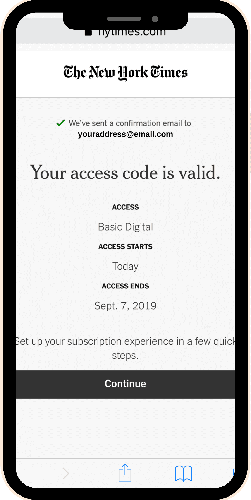
Once you have created your account (or logged in), you will receive an email confirmation of your 72-hour, unlimited access to New York Times Digital (pictured below) . If you do not receive this confirmation email, please review the above instructions to ensure that you have completed each step.
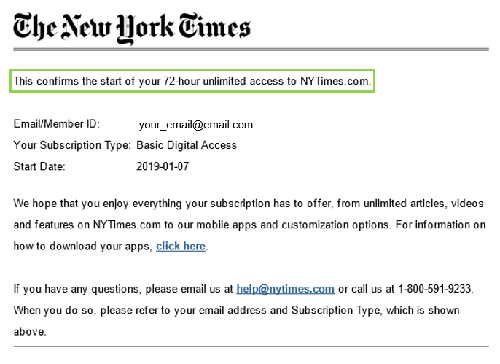
After the first 72 hours have passed, you will need to redeem another code for another 72 hours of remote access (i.e. Repeat Step 2). This is the licensing model that New York Times has negotiated with public libraries.
Please be advised that registering an email address with New York Times Digital may opt you into receiving email marketing communications from the New York Times. To opt out of receiving mailings, uncheck the box as shown in the above image, or use the New York Times app to disable notifications.